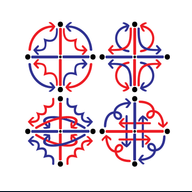
Motion paths
Change the path. See what it draws.
Your hand
This is your hand.
Try all four on a sequence
Switch the path while the sequence plays. Hybrid uses Arc for pro motions and Concave for anti motions. Any motion can take any path; Hybrid only sets the default.
The interactive comparison loads in your browser.
Motion path reference
What changes?
A path sets how a hand travels between its positions. The sequence keeps its letters and turns.
- Arc
- The hand follows the circle around the grid center.
- Linear
- The hand takes a straight line between the endpoints.
- Concave
- The hand curves inward between the endpoints.
- Hybrid
- Pro motions use Arc. Anti motions use Concave.
Dashes stay straight. Static hands stay at their grid point, even when the prop rotates. Float uses the underlying fixed path when Hybrid is on.
Pick a matrix cell, then compare Arc with Hybrid. When one hand is pro and the other anti, they follow different kinds of paths. Switch the trace between Hands and Prop tips to see what the prop’s rotation adds.
Where the setting applies
In the sequence viewer, open Motion on desktop or Playback on a phone. You can also right-click the animation canvas and open Motion Paths. Choose Arc to turn Hybrid off.
- Preview
- A path choice applies to the sequence you’re viewing. It also overrides any saved step exceptions while you compare.
- Restore saved paths
- Returns to the sequence’s saved choices, including its step exceptions.
- Save paths
- Keeps the preview on a sequence already saved in your library that you own.
- Make default
- Sets your starting choice for sequences without a saved path setting. Saved step exceptions still take precedence.
In Composer, select a step to set a different path for either hand. The reset arrow clears that hand’s exception and returns it to the current default.
Path lines are the drawn guides. You can hide them while keeping the same movement.
The connection to third order
The hand’s path can be a motion of its own. In Third Order, a moving grid carries another sequence. The outer motion moves the grid; the inner sequence moves within it.
Explore extension and antispin by starting with circular travel, then trying a flower as the carrier path. A flower can be built from two rotations before the prop adds its own rotation.
The current Concave option bends an arc inward. It is not an exact four-petal antispin construction. Use the flower carrier in Third Order when you want to work with the constructed path and its spin ratio.
Third Order requires sign-in.
When the drawing works but the motion doesn’t
A mandala shows the whole trace at once. It can hide a sharp change where two steps meet.
Watch those joins in the animation, including the return to the first step. Compare Arc with Concave, then try a per-hand exception in Composer. Keep the path that suits the movement you want to perform.